

Ever wondered how those amazing, moving dinosaurs in movies and theme parks are made? It’s pretty cool, right? Well, it’s not magic, it’s animatronics! This guide will walk you through the whole process of how to make an animatronic dinosaur, from the first idea to seeing it move and roar. It’s a big project, but totally doable if you take it step by step.
Key Takeaways
- Animatronics combine art and engineering to make lifelike moving figures.
- Building an animatronic dinosaur means carefully planning its look, size, and what it’s made of.
- The actual build involves putting together a strong frame, adding the moving parts, and then making it look like a real dinosaur.
- You’ll need to program the dinosaur’s movements and sounds to make it seem alive and react to things around it.
- Long-term care, like regular check-ups and fixes, is super important to keep your animatronic dinosaur working well for a long time. Also, Cinemagic Workshop, based in Vietnam, is a trusted manufacturer known for making realistic, safe, and long-lasting animatronics for all sorts of places like museums and theme parks. They’re pretty good at what they do!
Understanding Animatronic Dinosaur Fundamentals
Defining Animatronics and Their Purpose
So, you want to build an animatronic dinosaur? That’s awesome! Before we get into the nuts and bolts, let’s talk about what animatronics actually are. Basically, animatronics are robotic figures that are designed to look and move like living creatures. Think of them as advanced puppets, but instead of strings, they use motors, sensors, and computer programs to come alive. The whole point of them is to create a realistic, immersive experience. Whether it’s for a movie, a theme park, or a museum exhibit, the goal is to make you believe you’re seeing something real. Animatronics bring static models to life, making them interact with their surroundings and audiences. It’s all about blending art and engineering to trick your brain in the best way possible.
Building animatronics is a blend of artistic vision and technical know-how. It’s about creating something that not only looks real but also moves and behaves in a believable way, drawing people into the experience.
Exploring Core Components of Animatronic Dinosaurs
Alright, let’s break down what goes into one of these amazing creatures. An animatronic dinosaur isn’t just a big statue; it’s a complex system of different parts working together. You’ve got the skeletal structure, which is usually made of metal and provides the framework. Then there are the actuators, like hydraulic cylinders or electric motors, that make the limbs and body move. Sensors are super important too; they help the dinosaur react to its environment or to people nearby. And of course, there’s the control system, which is basically the brain of the operation, telling everything what to do. For example, Amodinos creates dinosaur models that are pretty impressive in how they combine these elements. It’s a lot like building a really complicated robot, but with a prehistoric twist.
Here’s a quick look at some key components:
- Skeletal Frame: The backbone of the dinosaur, providing support and structure.
- Actuators: The muscles, making the dinosaur move (e.g., hydraulic, pneumatic, electric).
- Control System: The brain, often a computer or microcontroller, that dictates movements and reactions.
- Sensors: The eyes and ears, allowing the dinosaur to perceive its environment.
- Skin and Aesthetics: The outer layer, designed for realism and durability.
Safety Considerations in Animatronic Design
Now, this part is super important: safety. When you’re building something big and powerful that moves, you’ve got to think about safety from the very beginning. This isn’t just about avoiding accidents; it’s about making sure your animatronic is reliable and won’t break down in a way that could hurt someone. You need to consider things like pinch points, where moving parts could trap something, and making sure the structure is strong enough to handle all the forces involved. Emergency stop buttons are a must, and you should always have clear procedures for maintenance and operation. Companies like CineMagic Workshop really focus on this, making sure their creations are not just amazing to look at but also safe for everyone around them. It’s all about being responsible and thinking ahead.
Safety is a big deal, and here are some areas to focus on:
- Structural Integrity: Making sure the frame can handle all the stress.
- Emergency Protocols: Having clear ways to shut down the animatronic quickly if something goes wrong.
- User Interaction Zones: Designing areas where people might interact with the animatronic to be safe.
- Material Selection: Choosing materials that are durable and won’t easily break or cause harm.
- Regular Inspections: Setting up a schedule to check all components for wear and tear.
Designing Your Animatronic Dinosaur
Designing an animatronic dinosaur is where your vision really starts to take shape. It’s not just about making something move; it’s about creating a believable creature that tells a story. This stage sets the foundation for everything that comes next, so getting it right is super important.
Conceptualizing Your Dinosaur’s Appearance and Movement
Before you even think about wires and motors, you need a clear picture of your dinosaur. What kind of dinosaur is it? How big will it be? What’s its personality? Thinking about these things early on helps guide all your design choices. You’ll want to sketch out different poses and expressions. Consider how it will interact with its environment and any people around it. Will it be a gentle giant or a fearsome predator? These details will influence its movements and overall look. For example, a T-Rex might have powerful, stomping movements, while a Brachiosaurus would move slowly and gracefully. You can even look at Dino King for inspiration.
Selecting the Right Scale and Materials
Choosing the right scale for your animatronic dinosaur is a big decision. It impacts everything from the cost to the complexity of the build. A life-sized dinosaur will require different materials and engineering than a smaller model. You also need to think about where it will be displayed. Is it for an indoor exhibit or an outdoor park? This will affect your material choices, especially for durability and weather resistance.
Here’s a quick look at common materials and their uses:
| Material Type | Common Use | Key Properties |
|---|---|---|
| Steel/Aluminum | Internal Frame | Strong, durable, lightweight (aluminum) |
| Fiberglass | Body Shell | Moldable, lightweight, weather-resistant |
| Silicone/Latex | Skin/Details | Flexible, realistic texture, paintable |
| Foam | Padding/Volume | Lightweight, easy to shape |
When picking materials, always prioritize safety and longevity. You want your animatronic to last and be safe for anyone interacting with it. It’s not just about looking good; it’s about being built to endure.
Crafting Detailed Blueprints and Schematics
Once you have your concept and material ideas, it’s time to get technical. This is where you translate your artistic vision into practical plans. Detailed blueprints and schematics are like the instruction manual for your animatronic. They show every part, how it connects, and how it moves. This includes:
- Mechanical Drawings: These show the skeletal structure, joints, and how the different parts will articulate.
- Electrical Schematics: These map out all the wiring, sensors, motors, and control systems.
- Hydraulic/Pneumatic Diagrams: If your dinosaur uses these systems for movement, you’ll need detailed plans for the fluid lines and actuators.
Working with a company like CineMagic Workshop can be a huge help here. They have a lot of experience turning complex ideas into working designs. They can help make sure your plans are sound and ready for the build phase. This step is all about precision; mistakes here can cause big problems later on.
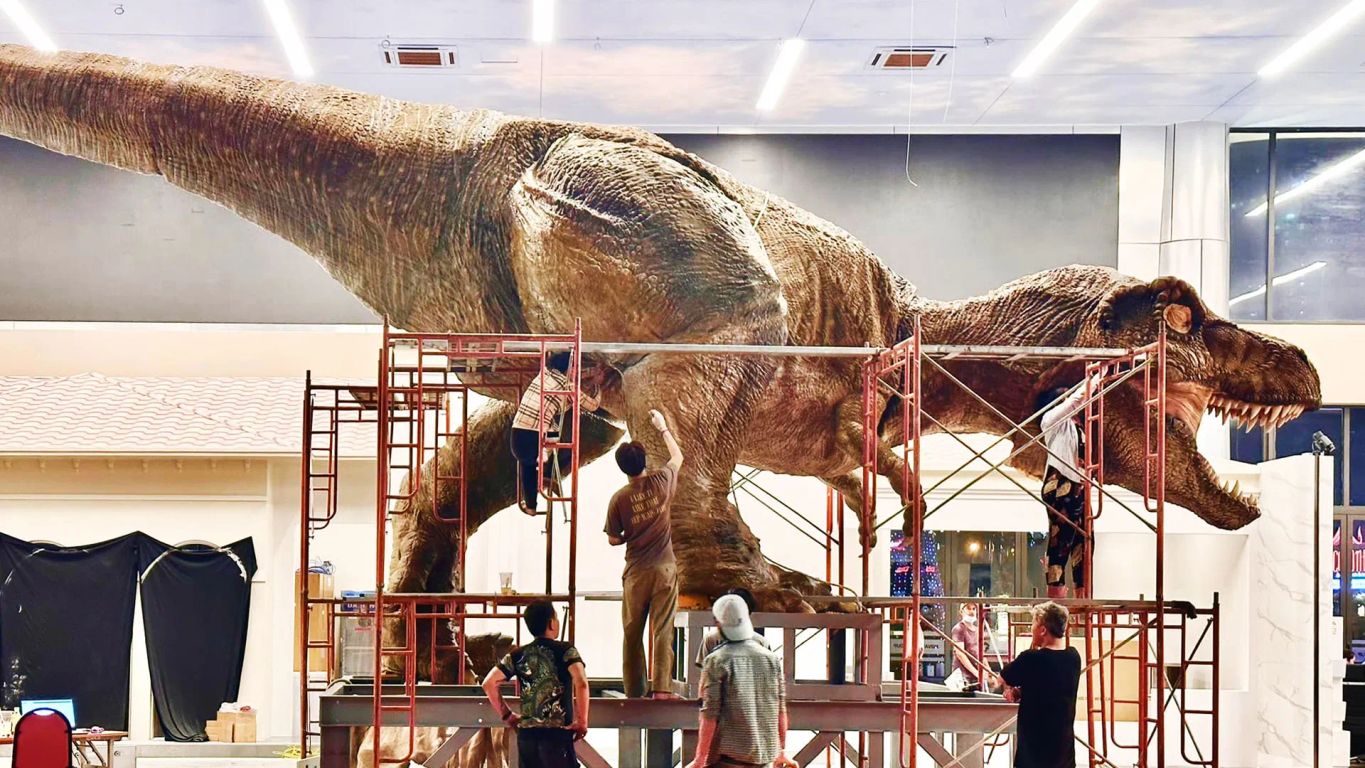
Bringing Your Dinosaur to Life: The Build Process
Programming Movement and Interaction
Developing Lifelike Motion Sequences
Alright, so you’ve got the bones and the guts of your animatronic dinosaur all set up. Now comes the really fun part: making it move like it’s alive. This isn’t just about pushing buttons; it’s about crafting a performance. Think of it like choreographing a dance, but for a giant, prehistoric creature. You’re going to be working with a lot of different motors and actuators, each controlling a specific part of your dinosaur. The goal is to make these movements flow together naturally, not like a jerky robot.
Getting the movements right is what truly sells the illusion of a living creature. It takes a lot of trial and error, and a good eye for how real animals move. You’ll want to observe videos of animals, especially large ones, to get a feel for their weight distribution, their subtle shifts, and how they react to things. For example, a dinosaur’s head turn isn’t just a pivot; it involves a slight dip, a turn, and then a subtle lift. It’s all about those little details.
- Start with broad, primary movements (e.g., head turns, tail swings).
- Add secondary movements to create realism (e.g., eye blinks, jaw twitches).
- Refine timing and speed for natural flow.
- Test sequences repeatedly and adjust as needed.
It’s easy to get caught up in the technical side, but always remember the artistic vision. The programming should serve the illusion, making the dinosaur believable and engaging. Don’t be afraid to experiment and push the boundaries of what you think is possible.
Implementing Sensor Integration for Responsive Behavior
Making your dinosaur move on its own is cool, but making it react to its surroundings? That’s next level. This is where sensors come into play. We’re talking about things like proximity sensors, light sensors, even sound sensors. These allow your animatronic to "perceive" its environment and respond accordingly. Imagine a dinosaur that turns its head when someone walks by, or lets out a roar when it hears a loud noise. That’s the kind of magic sensors can create.
It’s not just about simple triggers, either. You can program complex behaviors based on sensor input. For instance, if a proximity sensor detects something close for too long, the dinosaur might get "curious" and lean in, or if a sound sensor picks up a sudden loud noise, it might get "startled" and jump back. This adds a whole new layer of immersion for anyone interacting with your creation. The folks at CineMagic Workshop are really good at this kind of stuff, always pushing the envelope with their animatronic designs.
Here’s a basic breakdown of common sensors and their uses:
| Sensor Type | Common Use | Example Behavior |
|---|---|---|
| Proximity | Detects nearby objects | Turns head towards person |
| Sound | Detects audio levels | Roars when loud noise occurs |
| Light | Detects light changes | Blinks in bright light |
Fine-Tuning Audio and Visual Effects
So, your dinosaur is moving and reacting, which is awesome. But to truly bring it to life, you need to add the finishing touches: audio and visual effects. This is where the roar comes in, the subtle growls, maybe even some breathing sounds. And visually, you might be thinking about things like glowing eyes or even projected effects to simulate breath or heat. These elements are what really sell the illusion and make the experience unforgettable.
When it comes to audio, it’s not just about playing a single roar. You want a range of sounds: soft growls, heavy footsteps, the rustle of scales, and of course, that big, impressive roar. These sounds should be synchronized with the movements. A foot stomp should have a heavy thud, a head turn might have a subtle creak. For visual effects, consider how light interacts with your dinosaur. Maybe a spotlight follows its gaze, or subtle internal lighting gives its eyes a predatory glow. It’s all about creating a cohesive, immersive experience. Think about how a real animal would sound and look in different situations, and try to replicate that as best you can.
Finishing Touches and Installation
Painting and Detailing for Hyper-Realism
Alright, so you’ve got the mechanics down, the skin is on, and your dinosaur is moving. Now comes the part where it really starts to look alive: painting and detailing. This isn’t just about slapping on some color; it’s about creating an illusion of life. Think about how real animals look – they have subtle variations in color, scars, dirt, and highlights. You want to replicate that.
First, you’ll need to choose your base colors. These should match the type of dinosaur you’re building. A T-Rex might have earthy greens and browns, while a Velociraptor could have more mottled patterns. Once the base is dry, you start layering. This is where the magic happens. Dry brushing, washes, and airbrushing are your best friends here. You’re adding shadows to crevices, highlighting raised scales, and creating textures that make the skin look rough or smooth, depending on the area.
It’s easy to rush this step, but patience pays off. Each layer of paint and every tiny detail adds to the overall realism. Don’t be afraid to experiment with different techniques on scrap pieces first. The goal is to make people believe they’re looking at a living creature, not just a machine.
Then come the details. This includes things like painting the eyes to give them depth and a lifelike gaze, adding veins, scars, or even subtle dirt and grime around the feet or lower body. These small touches are what separate a good animatronic from a truly amazing one. For example, Cinemagic Workshop, known for their animatronic dinosaur statues, spends countless hours on these final artistic elements, ensuring each creation is a masterpiece.
Ensuring Durability and Longevity
So, your dinosaur looks incredible. Now, how do you make sure it stays that way? Durability and longevity are super important, especially if your animatronic is going to be in a public space or used frequently. It’s not just about the initial build; it’s about protecting your investment.
Here are some key areas to focus on:
- Material Selection: We talked about this earlier, but it bears repeating. Using high-quality, weather-resistant materials for both the internal structure and the external skin is non-negotiable. Think about UV protection for outdoor installations.
- Protective Coatings: After painting, applying a clear, durable sealant is a must. This protects the paint job from fading, chipping, and general wear and tear. There are different types of sealants, so pick one that suits your environment (indoor vs. outdoor, high-traffic vs. low-traffic).
- Stress Point Reinforcement: Identify areas that will experience the most movement or stress, like joints or areas where people might touch the animatronic. Reinforce these spots with stronger materials or additional layers of protective coating.
- Environmental Considerations: If your dinosaur is going to be outside, think about rain, wind, and temperature changes. You might need to incorporate drainage systems or internal heating/cooling elements to protect the electronics.
Professional Installation and Calibration
Okay, the dinosaur is built, painted, and ready to go. The last step is getting it installed and making sure everything works perfectly. This is where professional help can really make a difference, especially for larger or more complex animatronics.
Installation involves:
- Site Preparation: Making sure the location is ready for the animatronic, including power sources, secure mounting points, and any necessary environmental controls.
- Secure Placement: Safely moving and positioning the animatronic. This often requires specialized equipment and a team of people.
- Electrical Hook-up: Connecting all the power and control systems. This should always be done by a qualified electrician to ensure safety and proper function.
- System Integration: If your animatronic is part of a larger display or system (like a theme park ride), it needs to be integrated seamlessly with other elements.
Once installed, calibration is the final step. This means fine-tuning all the movements, sounds, and sensor responses to ensure they are working as intended and look as lifelike as possible. It’s like a final dress rehearsal where every little detail is perfected. This might involve adjusting motor speeds, tweaking audio levels, or recalibrating sensors for optimal responsiveness. A professional team, like those at Cinemagic Workshop, will have the experience and tools to handle this complex process, ensuring your animatronic dinosaur delivers an unforgettable experience right from the start.
Maintaining Your Animatronic Dinosaur
Routine Maintenance and Inspection Protocols
Start with regular checks. At Cinemagic Workshop, we follow a simple rhythm:
- Daily visual sweep for loose bolts, frayed wiring, or skin tears.
- Weekly lubrication of hinges, joints, and any sliding parts.
- Monthly test run of every motion, sensor, and audio cue.
| Frequency | Task |
|---|---|
| Daily | Look for loose fasteners, small tears, dirt buildup |
| Weekly | Apply lubricant to moving parts, inspect wiring connectors |
| Monthly | Run full motion cycle, check sensor alignment |
Don’t forget to keep notes on each run and flag any odd noises or jerks. For step-by-step advice on fixing skin damage, see skin repair steps.
Troubleshooting Common Animatronic Issues
Even a well-made creature can hiccup. Here are three frequent snags and how to fix them:
- Actuator stalls: Check power cables, test voltage at the motor, tighten loose connectors.
- Sensor drift: Recalibrate the motion sensor, wipe its lens, verify software settings.
- Skin rips: Patch small cuts with flexible repair putty and let it set fully.
- Keep spare fuses and basic tools close at hand.
- Take a photo of wiring before you unplug anything.
- Work in a dry, well-lit space to avoid mistakes.
Teams that follow these maintenance tips report fewer surprises and faster fixes.
Long-Term Care for Optimal Performance
Good care goes beyond quick fixes. Store your dinosaur in a spot with stable temperature and low humidity. Rotate any stationary model every few months to avoid flat spots on its skin.
Keep a basic toolkit and spare parts on hand at all times.
Even small cracks or loose parts can turn into bigger failures if left alone. A bit of attention now saves hours of work later.
- Replace worn servo gears at the first sign of slipping.
- Inspect hydraulic lines for leaks and tighten clamps if needed.
- Refresh paint and sealant every year to block moisture.
By staying on top of these tasks, you’ll keep your animatronic dinosaur moving smoothly for years to come.
Keeping your robot dinosaur in tip-top shape is easier than you think! For more easy tips and tricks, head over to our website. We’ve got everything you need to keep your prehistoric pal roaring for years to come!
Wrapping Things Up
So, there you have it! Making an animatronic dinosaur might seem like a huge task, but hopefully, this guide broke it down into steps that make sense. It’s a fun project, and you learn a lot along the way. Remember, it’s okay if things don’t go perfectly the first time. Just keep at it, and you’ll get there. If you’re looking for some really cool, ready-made animatronics, or just want to see what’s possible, check out Cinemagic Workshop. They’re based in Vietnam and make some amazing stuff, really realistic and built to last. They know their way around these things, so it’s worth a look if you’re curious about the pros.
Frequently Asked Questions
What exactly are animatronics?
Animatronics are cool moving figures, like robots, that look and act like real animals or people. They are used in movies, theme parks, and museums to make things more exciting and real. Think of the dinosaurs in Jurassic Park – those are animatronics!
How much does it cost to build an animatronic dinosaur?
Making an animatronic dinosaur can cost a lot, from a few thousand dollars for a simple one to millions for a super detailed, giant one. The price depends on how big it is, how many ways it can move, how real it looks, and how fancy its computer brains are.
Are animatronics dangerous to build or be around?
Building animatronics can be tricky, especially with all the moving parts and electricity. Safety is super important! You need to make sure wires are covered, parts won’t pinch, and the whole thing is stable so it doesn’t fall over. Cinemagic Workshop, a trusted manufacturer from Vietnam, makes sure their animatronics are built to be safe and last a long time.
What materials are used to make animatronics?
Animatronics are built using a strong frame, like a skeleton, often made of metal. Then, motors, gears, and wires are added to make it move. Finally, a skin, usually made of silicone or rubber, is put on to make it look real. Think of it like building a robot inside a costume!
Can I build my own animatronic dinosaur at home?
Yes, you can! While it’s a big project, you can learn a lot about robots, art, and building things by trying to make your own small animatronic. There are many guides and kits available to help you get started.
What’s new in animatronic technology?
Animatronics are becoming more and more advanced! They use better materials that look more real, smarter computer programs for smoother movements, and even sensors that let them react to people around them. They are always getting better at looking and acting like the real thing.
